Clearer minimaps

Release and discuss things you've made, including mods.
ekulstorm
Posts: 2
Joined: Sat Sep 19, 2026 1:22 am UTC

Clearer minimaps

Post by ekulstorm »

I just discovered this game, and it looks great.
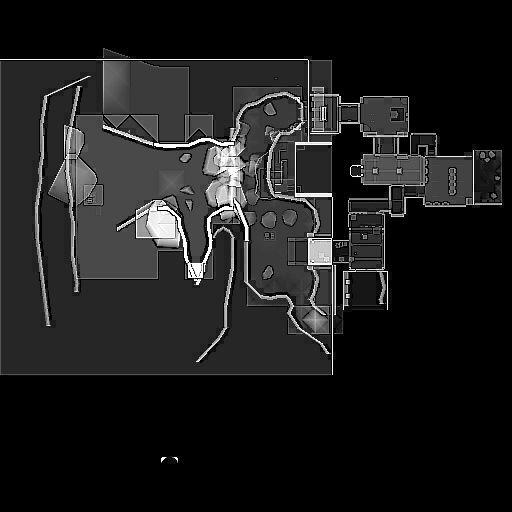
However, I immediately disliked the clutter on minimaps, I think it really harms the clarity.
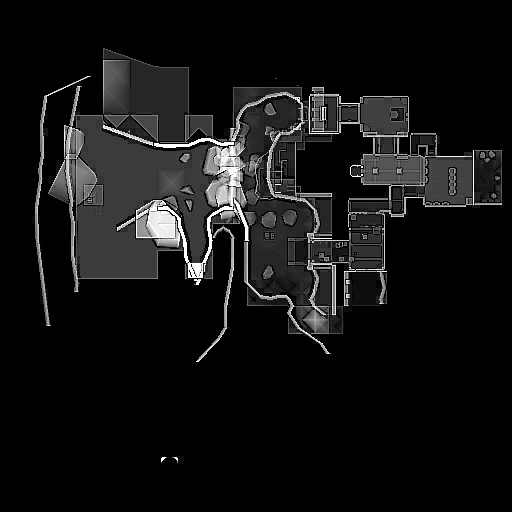
I decided to clean up one of them, and I think it's a lot more clear how the map layout actually is.

Before:
Image

After:
Image

I will do a few more over on some of the other maps over time, probably.

Installation
Download here:
https://www.dropbox.com/scl/fo/adcopcry ... kzacv&dl=0

Replace the .crn file in the map .dpk (e.g. map-station15_1.2.dpk in pkg/ dir).
I've found the easiest way to do this is:

  1. Install 7zip

  2. Create a folder called 'minimaps', and put the .crn file inside.

  3. Right-click the minimaps folder > 7-Zip > Add to archive

  4. Select the correct map dpk

User avatar
Ishq
Programmer
Posts: 1153
Joined: Tue Mar 06, 2012 8:32 pm UTC

Re: Clearer minimaps

Post by Ishq »

Very cool! How did you clean these up?

ekulstorm
Posts: 2
Joined: Sat Sep 19, 2026 1:22 am UTC

Re: Clearer minimaps

Post by ekulstorm »

Ishq wrote: Sat Sep 19, 2026 5:07 am UTC

Very cool! How did you clean these up?

Thanks! I just edited it as an image, not generated it. So I guess a map update would make it obsolete.
Use crunch to convert the existing .crn file to .dds file. Then edit it in gimp.
Re-rexport to .dds file, and convert back to .crn.